Well, because of my procrastination with SimplyCLI Desktop, someone else has risen to the occasion. Introducing INX which encompasses the concept I was hoping to achieve with SimplyCLI Desktop and WOW! is it beautiful. I am truly impressed. You can view a slideshow with screenshots here and even video screencast demonstrations here .
So, as of now SimplyCLI Desktop is no more (not that it got much further then the concept stage). I don't see a point in having 2 X-less Linux Desktop distros, plus INX has nearly everything I was hoping to achieve with SimplyCLI Desktop. I say nearly because there are a few things I hope INX will expand upon and could improve. First is the name (though I doubt this will change). SimplyCLI Desktop I think is more marketable. INX is very gnu-geek with the whole acronym thing. Also, I would like to see some tutorials by example integrated into INX. I already have several written. Another thing is an installer. One is being worked on, so I'll need to see how that is going. Finally, I didn't see much in the way of video, image or PDF viewers integrated in the menu interface. Mplayer, fbi and fbgs which facilitate framebuffer would be great additions. Solutions on the CLI for these media types is essentially unknown to most and when demonstrated can be very impressive.
Anyway, I plan to contact the maintainer to see what I can do to help contribute. So in the mean time go check out INX and let me know what you think.
Wednesday, August 20, 2008


Wednesday, May 7, 2008
Let's Try This Again.
So many things to blog about and so little time. My personal life has become very hectic thus my lack of blogging. My work load at my job has nearly doubled and my wife has taken on a business venture leaving me to have to take care of more things at home including our almost 2 yr old son. In addition to this madness, my wife is about to pop with a new baby we've been cooking, which I foresee even less time spent on hobbies and blogging.
This being said, I think I have resolved the liveCD issue mentioned in a previous blog for my pet project SimplyCLI Desktop. I have yet to experiment with this new process which is explained here. It seems pretty straight forward and makes sense as I've read through the instructions, but I've yet to actually test it. I'm hoping to get to it before the baby comes in the next 2 1/2 weeks.
I've been dying to blog about a few things like KDE4, crunchbang Linux and a few more tutorials and perhaps some day I will, but time moves on and unfortunately blogging is towards the bottom of my priorities at the moment. Nevertheless, I'm still plugging along.
So, to the random person who just happens to fall upon this blog, I want you to know I'm still alive and SimplyCLI Desktop will happen.
This being said, I think I have resolved the liveCD issue mentioned in a previous blog for my pet project SimplyCLI Desktop. I have yet to experiment with this new process which is explained here. It seems pretty straight forward and makes sense as I've read through the instructions, but I've yet to actually test it. I'm hoping to get to it before the baby comes in the next 2 1/2 weeks.
I've been dying to blog about a few things like KDE4, crunchbang Linux and a few more tutorials and perhaps some day I will, but time moves on and unfortunately blogging is towards the bottom of my priorities at the moment. Nevertheless, I'm still plugging along.
So, to the random person who just happens to fall upon this blog, I want you to know I'm still alive and SimplyCLI Desktop will happen.
Sunday, February 24, 2008
The Perfect irssi Configuration or 3 Apps in One.
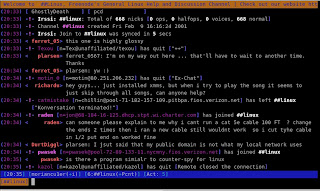
I love irssi! I use irssi as an all in one irc, instant messenger and twitter client. Here is how I did it.
IRC
First irssi as an irc client. This is what irssi was originally designed to be. irssi is a console application that can run in screen. You can install irssi by:
sudo aptitude irssi
If you are unfamiliar with irc, then here is a quick explanation and how to.
irc stands for instant relay chat. It essentially gives you access to a chat room. I connect to a few linux irc groups on a regular basis to interact with fellow Linux-ites and to ask questions. Just type irssi at the command line. Once started, You will need to connect to a server. Freenode has tons of interesting irc groups. You can see a list of Freenode irc groups here. to connect to Freenode type the following in irssi:
/connect irc.freenode.net
to join the general linux group, type:
/j #linux
You use esc+# (could also be alt+#) key to move through the irssi 'screens'. (i.e. esc+1 for screen one, esc+2 for screen two, etc)
IM
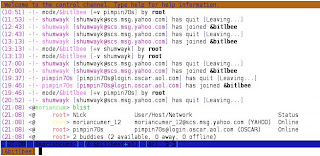
Now let's set up Your instant messenger in irssi with bitlbee.
Install bitlbee:
sudo aptitude install bitlbee
In irssi, connect to a bitlbee server. There are several servers available, I use the following:
/connect im.bitlbee.org
If this is your first time connecting to bitlbee you will need to register. You may need to move to the newly created bitlbee screen in irssi for the following.
register password
This should be a newly create password, used specifically for logging onto the bitlbee server. To set up your IM accounts.
Use the following as model to add your various accounts:
Yahoo
AIM
Jabber
MSN
accounts on
Save your settings:
/save
To see your buddies type:
blist
To chat, type your buddies name and message,
name: Hello world!
The next time you log on to bitlbee, identify yourself with your new bitlbee password:
identify [password]
Twitter
Finally, Let's get twitter going.
Download the twitter perl script from here and save it to your ~/.irssi/scripts directory as wd.pl. Then install a few dependencies.
sudo aptitude install libjson-perl libdatetime-format-strptime-perl libwww-perl
Next you will need to create the following file ~/.netrc by typing,
nano ~/.netrc
copy and paste the following in the file and save.
chmod 600 ~/.netrc
In irssi create an alias,
/save
Now twitter away by using the following.
will update all your friends twits and to post a twit, use the following:
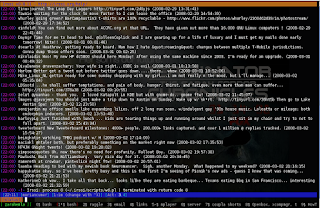
OOOOHHH YEAH! the perfect irssi set up. Now doesn't that feel good.
Learn more about twitter here.
IRC
First irssi as an irc client. This is what irssi was originally designed to be. irssi is a console application that can run in screen. You can install irssi by:
sudo aptitude irssi
If you are unfamiliar with irc, then here is a quick explanation and how to.
irc stands for instant relay chat. It essentially gives you access to a chat room. I connect to a few linux irc groups on a regular basis to interact with fellow Linux-ites and to ask questions. Just type irssi at the command line. Once started, You will need to connect to a server. Freenode has tons of interesting irc groups. You can see a list of Freenode irc groups here. to connect to Freenode type the following in irssi:
/connect irc.freenode.net
to join the general linux group, type:
/j #linux
You use esc+# (could also be alt+#) key to move through the irssi 'screens'. (i.e. esc+1 for screen one, esc+2 for screen two, etc)

IM
Now let's set up Your instant messenger in irssi with bitlbee.
Install bitlbee:
sudo aptitude install bitlbee
In irssi, connect to a bitlbee server. There are several servers available, I use the following:
/connect im.bitlbee.org
If this is your first time connecting to bitlbee you will need to register. You may need to move to the newly created bitlbee screen in irssi for the following.
register password
This should be a newly create password, used specifically for logging onto the bitlbee server. To set up your IM accounts.
Use the following as model to add your various accounts:
Yahoo
account add yahoo handle password
AIM
account add oscar MyScreenName MyPassword login.oscar.aol.com
Jabber
account add jabber example@server.com password server.address:port:ssl(?)
MSN
account add msn handle passwordOnce you have added your accounts, activate your accounts:
accounts on
Save your settings:
/save
To see your buddies type:
blist
To chat, type your buddies name and message,
name: Hello world!
The next time you log on to bitlbee, identify yourself with your new bitlbee password:
identify [password]

Finally, Let's get twitter going.
Download the twitter perl script from here and save it to your ~/.irssi/scripts directory as wd.pl. Then install a few dependencies.
sudo aptitude install libjson-perl libdatetime-format-strptime-perl libwww-perl
Next you will need to create the following file ~/.netrc by typing,
nano ~/.netrc
copy and paste the following in the file and save.
# set your username (e-mail address) and password in your ~/.netrc file.Change $username to your twitter username and $password to your twitter password and save the file. You can find this information in the wd.pl file you downloaded earlier. Once the file is saved, change the permissions of the file.
# eg.
# % echo "machine twitter.com login your@email.address password
# yourpass" > ~/.netrc
# % chmod 0600 ~/.netrc
#
my $username;
my $password;
chmod 600 ~/.netrc
In irssi create an alias,
/alias twit /exec ~/.irssi/scripts/wd.pl $*
and save./save
Now twitter away by using the following.
/twitwill update all your friends twits and to post a twit, use the following:
/twit -sv "hello World"

OOOOHHH YEAH! the perfect irssi set up. Now doesn't that feel good.
Learn more about twitter here.
NOTE:  THE wd.pl SCRIPT NO LONGER WORKS DUE TO A CHANGES
WITH TWITTER. I CURRENTLY DON'T HAVE A FIX FOR THE SCRIPT.
I HAVE BEEN IN CONTACT WITH THE DEVELOPER, BUT SEEMS TO
HAVE LOST INTEREST IN THE PROJECT.
Sunday, February 10, 2008
Wixi - A Personal Desktop Wikipedia
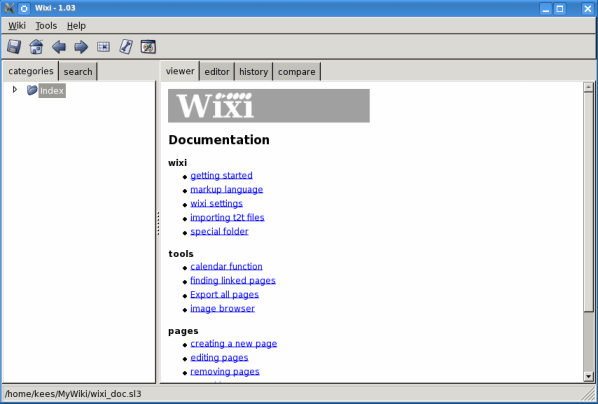
I've just discovered this great application wixi. It's a personal wikipedia you keep on your desktop. It comes in handy when you're creating documentation or trying to organize notes. It breaks out entries by pages which can be exported to html for web publishing. Pages can be easily be organized and viewed at a glance with a tree structure layout in a left hand column. The best feature is the search function. You're quickly and easily able to search through your documentation and notes.

Wixi is available for Linux, MAC OS X and that other OS. If you're using Ubuntu, you won't find it in the repos, but never fear, it's easy to install.
First install the dependencies:
Wixi is available for Linux, MAC OS X and that other OS. If you're using Ubuntu, you won't find it in the repos, but never fear, it's easy to install.
First install the dependencies:
sudo apt-get install python-wxgtk2.8 pysqlite
Then download wixi from here and unzip the package.
When you start wixi for the first time you'll be asked to create a new database where all your information will be stored. Just type the name for your database and you're done.

Enjoy!
unzip wixi-1.03-src.zip
Then go into the newly created directory and install. cd wixi-1.03/
sudo python setup.py install
Now you're good as gold. Just type "wixi" in a terminal or if you're using KDE press alt+F2 for the run dialog box.When you start wixi for the first time you'll be asked to create a new database where all your information will be stored. Just type the name for your database and you're done.

Enjoy!
Monday, January 21, 2008
Problems with LiveCD Image.
I've been struggling to create the liveCD image. I've attempted using the remastersys script from Linux Mint which should be compatible with Ubuntu 7.10, but I continue to get a disk drive error that no one else seems to be getting.
I'm in the process of looking for the best way to create my image for SimplyCLI Desktop, but I seem to be extremely busy lately with work, teaching, family and church. Needless to say it's going slowly. I'm an accountant and this is our year end wrap up at work, so there is a lot of over time and going in on Saturdays. Things should slow down mid-February. So posting will be spotty until then. If anyone is actually reading this catch the RSS feed at the bottom of the page.
Cheers!
I'm in the process of looking for the best way to create my image for SimplyCLI Desktop, but I seem to be extremely busy lately with work, teaching, family and church. Needless to say it's going slowly. I'm an accountant and this is our year end wrap up at work, so there is a lot of over time and going in on Saturdays. Things should slow down mid-February. So posting will be spotty until then. If anyone is actually reading this catch the RSS feed at the bottom of the page.
Cheers!
Subscribe to:
Posts (Atom)

 Posts
Posts


